Unlocking Creativity: A Guide to Procreate Duck Stamp and Template Brushes
In the rapidly evolving world of digital art, efficiency and inspiration often go hand in hand. For artists using the Procreate app on iPad, the right set of tools can transform a blank canvas into a masterpiece in minutes. Among the many resources available, specialized brush sets have become essential for illustrators, designers, and hobbyists alike. One such resource gaining attention is the Procreate Duck Stamp and Set of 2 Duck Template Brushes. This collection offers a unique blend of speed and structure, allowing creators to incorporate avian elements into their work without starting from scratch.
Whether you are designing a logo, creating storybook illustrations, or simply practicing your drawing skills, understanding how these specific brushes function can significantly enhance your workflow. This guide explores the purpose, application, and technical nuances of this brush set, ensuring you get the most out of your creative process.
The Power of Specialized Brush Sets in Digital Art
Digital painting has democratized art creation, but it also presents a paradox of choice. With thousands of brushes available, knowing which ones serve a specific purpose is crucial. Standard brushes allow for freehand drawing, which is excellent for organic shapes but can be time-consuming when repetition or precise symmetry is required. This is where stamp and template brushes shine.
Stamp brushes function similarly to physical rubber stamps. When you tap the screen, they imprint a pre-drawn image instantly. This is invaluable for adding texture, patterns, or recurring objects like leaves, clouds, or in this case, ducks. On the other hand, template brushes provide a faint outline or guide that you can trace over or use as a structural foundation. This hybrid approach allows artists to maintain the spontaneity of digital painting while adhering to consistent proportions.
The significance of these tools extends beyond mere convenience. In professional settings, such as graphic design or commercial illustration, consistency is key. If an artist needs to place five identical ducks in a scene, drawing each one by hand risks slight variations that might look unintentional. Using a stamp ensures uniformity, while a template allows for slight customization if needed. This balance between automation and artistic control is what makes sets like the Duck Drawing Template Stamps so valuable in modern creative workflows.
What’s Inside the Duck Stamp and Template Collection?
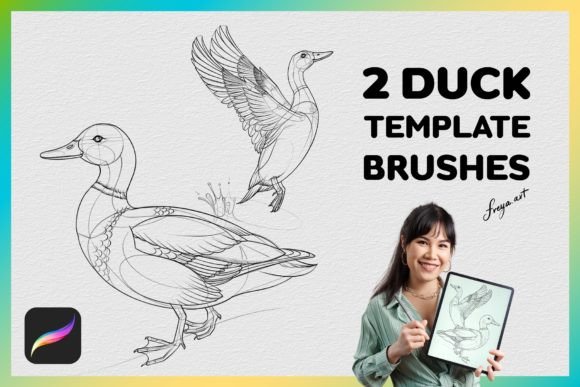
The specific set in question is designed with clarity and utility in mind. It includes two primary components tailored for avian illustration:
- 2 Duck Drawing Template Stamps Brushes: These are the core of the set. They likely offer different poses or styles of ducks—one might be a side profile for landscape scenes, while another could be a front-facing view for character design. The "template" aspect suggests that these brushes may offer a semi-transparent guide, allowing you to see the underlying sketch before committing to final lines.
- BONUS 1 Paper Texture: Digital art often suffers from looking too "clean" or sterile. Adding a paper texture overlay introduces grit, grain, and depth, mimicking traditional media like watercolor or charcoal. This bonus brush helps ground the digital duck stamps, making them feel more integrated into the artwork.
This combination addresses both the structural needs (the duck shapes) and the aesthetic needs (the paper texture) of an illustration project. It is a compact toolkit that punches above its weight class in terms of versatility.
Technical Requirements and Compatibility
Before diving into usage, it is critical to address the technical environment required for these tools. A common point of confusion for new digital artists is software compatibility. It is important to state clearly: Procreate brushes are made exclusively for the Procreate app for iPad.
These files typically come in a `.brush` format, which is proprietary to Procreate. They will not work in other popular software like Adobe Photoshop, Clip Studio Paint, or Corel Painter. Attempting to import them into these programs will result in errors or empty files. This limitation is due to the complex algorithms Procreate uses to simulate pressure sensitivity, tilt, and rotation, which differ significantly from other platforms.
Furthermore, the functionality of these brushes relies heavily on hardware interaction. Specifically, they work best when used with an Apple Pencil. Here is why:
- Pressure Sensitivity: Many stamp and template brushes are programmed to react to the amount of pressure applied. Lighter pressure might result in a fainter, ghosted line (perfect for tracing), while heavier pressure creates a solid, opaque stamp. Without a pressure-sensitive stylus, this dynamic range is lost.
- Tilt and Rotation: Advanced brushes may also detect the angle of the pencil, allowing for shading effects that mimic real-world drawing tools.
Understanding these requirements prevents frustration. If you do not have an iPad and Apple Pencil, investing in Procreate-specific assets is not feasible. However, for those within the Apple ecosystem, the integration is seamless and powerful.
How to Install and Use Your Instant Download
One of the greatest advantages of digital assets is immediacy. Upon completing your purchase, you gain access to an Instant Download. This means there is no waiting for shipping; the files are yours immediately. Here is a logical flow for getting started:
First, locate the downloaded file on your iPad. It usually arrives as a ZIP archive or a direct `.brush` file depending on the platform you purchased from. If it is zipped, you must unzip it first using the Files app. Next, open the Procreate app and navigate to your current project. Tap the brush icon in the top toolbar, then select the "+" sign to add a new brush. Choose "Import Brushes" and select your duck template files. Finally, select the newly imported brush and start drawing.
To use the templates effectively, try setting the opacity of your layer to around 50%. This allows you to see the stamped duck shape clearly but lightly enough to draw over it confidently. Once you have traced or refined the shape, you can increase the opacity or create a new layer for coloring.
Practical Applications in Modern Creativity
Why focus on duck templates specifically? While it may seem niche, the applications are surprisingly broad. Ducks are iconic symbols found in nature, folklore, children's literature, and even corporate branding. Their simple yet expressive shapes make them perfect subjects for learning anatomy and movement.
Education and Learning: For students of art, these brushes serve as excellent teaching aids. By studying the provided templates, beginners can learn the correct proportions of a duck's body, wing placement, and head shape. It removes the fear of the blank page, encouraging practice and experimentation.
Commercial Design: In the business world, speed is currency. A designer creating packaging for a farm-to-table product or a logo for a local pond conservation group can use these stamps to rapidly prototype ideas. Instead of spending hours vectorizing a duck, they can stamp a base shape, refine it, and move on to layout and typography.
Storytelling and Illustration: Authors and illustrators often need to populate scenes with background characters. Imagine a children's book about a spring day at the park. Rather than drawing ten individual ducks, an illustrator can use the stamp to place them quickly, varying their size and rotation slightly to create a natural flock effect. The included paper texture brush can then be used to give the entire scene a cohesive, storybook feel.
Common Misunderstandings and Best Practices
Despite their utility, some users hold misconceptions about template brushes. A common assumption is that using a stamp makes the artwork "cheating" or less authentic. In reality, all artists use references and shortcuts. Even traditional painters use stencils or underdrawings. The goal of digital art is not just to replicate reality but to communicate ideas efficiently. These brushes are tools, not replacements for creativity. The artist still decides the composition, color palette, lighting, and context.
Another misunderstanding involves the flexibility of the stamps. Some believe a stamp must remain rigid. However, Procreate allows you to manipulate layers. After stamping a duck, you can use the "Transform" tool to scale, rotate, or distort the shape. You can even paint over parts of the stamp to change its appearance entirely. The template is merely a starting point, not a final destination.
To maximize the potential of the Duck Stamp and Set of 2 Duck Template Brushes, experiment with blending modes. Try placing the paper texture on a "Multiply" or "Overlay" mode to see how it interacts with your colors. Don't be afraid to mix these digital stamps with hand-drawn elements to create a unique style that blends precision with organic flair.
Conclusion: Enhancing Your Digital Art Journey
The integration of specialized tools like the Procreate Duck Stamp and Template Brushes represents a significant step forward in digital accessibility. By providing instant, high-quality assets, these brushes empower artists to focus on what truly matters: storytelling, composition, and emotional expression. Whether you are a beginner looking to understand animal anatomy or a professional streamlining your design process, these tools offer a practical solution to common creative challenges.
Remember, technology serves creativity, not the other way around. With the right setup—an iPad, an Apple Pencil, and the Procreate app—you can unlock a world of possibilities. As you explore these brushes, keep in mind that they are meant to inspire, not limit. Use them to build confidence, speed up your workflow, and bring your unique vision to life, one duck at a time.