Evaluating the Watercolor Hand Drawing Brush Set for Professional Design
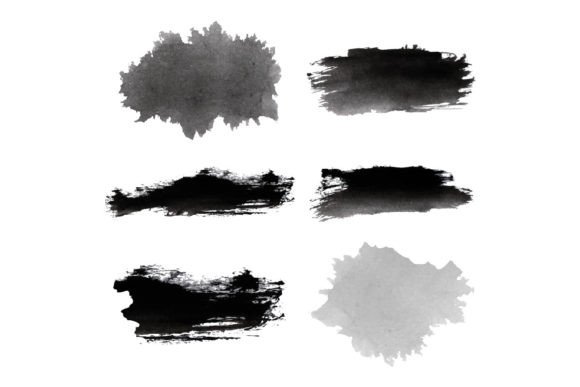
In the realm of digital illustration and graphic design, the quest for authentic textures often leads creators to seek resources that bridge the gap between traditional media and modern vector workflows. The Watercolor Hand Drawing Brush Set represents a specific category of digital assets designed to replicate the organic, fluid characteristics of watercolor painting while maintaining the precision required for scalable vector graphics. This collection typically features a set of black paint brushes isolated on a white background, offering a versatile foundation for designers who need to integrate hand-drawn aesthetics into commercial projects without sacrificing technical quality.
Understanding what constitutes this resource is the first step in determining its utility within your creative toolkit. Unlike standard digital brushes found in raster-based software like Photoshop, which rely on pixel manipulation, a high-quality Watercolor Hand Drawing Brush Set is often constructed as a hybrid asset. It combines the visual complexity of ink splatters, dry brush strokes, and wet-on-wet diffusion with the mathematical scalability of vector formats. The distinctiveness of this set lies in its dual nature: it provides the visual weight and irregularity of physical paint but delivers the clean edges and infinite resolution necessary for print and large-format signage.
What You Will Get in the Package
When evaluating a resource like the Watercolor Hand Drawing Brush Set, transparency regarding file deliverables is crucial for workflow integration. A comprehensive package ensures that the asset can be utilized across various stages of production, from initial concepting to final export. Typically, a professional-grade set includes a robust array of file formats, each serving a specific function in the design pipeline.
- AI File: The Adobe Illustrator source file allows for deep customization. Users can ungroup elements, adjust stroke weights, modify anchor points, and change colors directly within the vector environment. This is essential for brands requiring strict adherence to color guidelines.
- EPS File: As an industry-standard vector format, the Encapsulated PostScript (EPS) file ensures compatibility with a wide range of pre-press and legacy design software, making it ideal for printing houses and older systems.
- PNG File: For web designers or those working in non-vector environments, the Portable Network Graphics (PNG) files provide high-resolution raster images with transparent backgrounds. These are ready-to-use for social media, websites, and presentations where vector editing is not required.
- SVG File: Scalable Vector Graphics are optimized for web performance. They allow the Watercolor Hand Drawing Brush Set to be embedded directly into HTML code, ensuring crisp rendering on all screen sizes without increasing page load times.
- Preview JPEG File: While not an editable asset, the preview image serves as a quick reference for evaluating the style, texture, and overall aesthetic of the brushes before committing to the download.
This multi-format approach addresses a common pain point in digital asset acquisition: the inability to use a single file type across different platforms. By providing both vector and raster options, the Watercolor Hand Drawing Brush Set becomes a flexible tool rather than a rigid constraint.
Comparing Vector Brushes to Raster Alternatives
Designers often face a choice between using a dedicated Watercolor Hand Drawing Brush Set in vector format versus creating similar effects using raster brushes in software like Procreate or Photoshop. Each approach has distinct tradeoffs that influence the final output and the efficiency of the workflow.
Raster brushes excel at mimicking the chaotic, unpredictable nature of real watercolor. They capture subtle gradients, pigment settling, and paper grain with a level of fidelity that vectors sometimes struggle to achieve without becoming excessively complex. However, the primary limitation of raster assets is resolution dependency. Once a raster image is created at a specific size, scaling it up results in pixelation and loss of clarity. This makes them less suitable for large-scale applications such as billboards, packaging, or apparel printing.
In contrast, the Watercolor Hand Drawing Brush Set offers the advantage of infinite scalability. Because the shapes are defined by mathematical paths rather than pixels, they remain sharp regardless of how much they are enlarged. This is particularly valuable for branding projects where consistency across mediums—from business cards to building wraps—is paramount. Furthermore, vector brushes allow for precise color separation, a requirement for many offset printing processes. While achieving the exact "wet" look of watercolor in vector form requires skilled path manipulation, the resulting file is cleaner, lighter in terms of data structure, and easier to edit post-creation.
The decision often comes down to the intended medium. If the project is strictly for digital screens where slight pixelation might go unnoticed, or if the artistic goal is hyper-realistic texture, raster brushes may be preferable. However, for commercial design work requiring versatility, the vector-based Watercolor Hand Drawing Brush Set generally provides a more robust solution.
Strengths and Limitations of the Black and White Style
A defining characteristic of many professional brush sets, including the one described here, is the presentation of black paint brushes on a white background. This monochromatic approach is not merely an aesthetic choice; it is a functional strategy that enhances usability.
The strength of a black-and-white Watercolor Hand Drawing Brush Set lies in its neutrality. Without pre-applied color, these brushes act as a blank canvas, allowing designers to apply any hue, gradient, or blend mode to suit their specific project requirements. In vector software, changing the fill color of a black shape is instantaneous, whereas recoloring a textured raster image can often result in muddy tones or loss of detail. This flexibility makes the set highly efficient for rapid prototyping and iteration.
However, there are limitations to consider. The absence of inherent color means that the user must have a degree of proficiency in color theory and software tools to realize the full potential of the brushes. Additionally, the stark contrast of black on white may not always convey the subtle tonal variations found in actual watercolor washes. Users relying solely on the default appearance might find the assets too graphic or harsh compared to the softness of traditional media. To mitigate this, advanced users often utilize blending modes, opacity adjustments, and layer effects to soften the edges and introduce depth, effectively simulating the translucency of watercolor paint.
Best-Fit Situations and Decision Factors
Determining when the Watercolor Hand Drawing Brush Set is the right choice involves analyzing the specific demands of your project. Several scenarios highlight where this resource excels over other alternatives.
Brand Identity and Logo Design: For startups or businesses seeking a handcrafted, artisanal feel, these brushes are invaluable. The organic lines suggest human touch and creativity, distinguishing the brand from competitors using sterile geometric shapes. The vector format ensures the logo remains crisp on all applications.
Editorial and Publication Layouts: Magazines, books, and blogs often require decorative elements that do not overpower the text. The clean, isolated nature of the black brushes on a white background allows them to serve as effective dividers, chapter headers, or background accents without introducing visual clutter.
Web and UI Design: With the inclusion of SVG files, these brushes are perfectly suited for modern web interfaces. They can be used to create unique buttons, loading animations, or illustrative icons that add personality to a user interface while maintaining fast load speeds.
Conversely, there are situations where this set may not be the optimal choice. If a project demands photorealistic watercolor textures with complex pigment interactions, a photographically scanned watercolor paper texture or a high-end raster brush engine might be more appropriate. Similarly, if the design workflow is strictly limited to 3D modeling software that does not support vector importation efficiently, the benefits of the AI and EPS files may be lost.
Conclusion on Resource Selection
The Watercolor Hand Drawing Brush Set occupies a strategic niche in the digital design landscape, offering a balance between artistic expression and technical precision. By providing a suite of file formats including AI, EPS, PNG, SVG, and JPEG previews, it caters to a diverse range of professional needs. While it may lack the immediate textural depth of some raster alternatives, its scalability, editability, and neutral color palette make it a superior choice for commercial applications where flexibility and quality control are paramount.
Ultimately, the value of this resource depends on how well it aligns with your specific workflow and project goals. For designers prioritizing versatility and the ability to scale assets without quality loss, the vector-based approach of this brush set offers a compelling advantage. Careful evaluation of your project's requirements—weighing the need for realism against the necessity of scalability—will guide you toward the most effective use of these hand-drawn digital tools.