Procreate Parrot Stamp: A Practical Evaluation of Template Brushes for Digital Artists
Digital illustration often requires a balance between creative freedom and structural accuracy. For artists working within the Procreate app on iPad, achieving anatomical precision in complex subjects like birds can be time-consuming. The Procreate Parrot Stamp set addresses this specific workflow bottleneck by offering pre-drawn templates that streamline the initial sketching phase. This resource is not merely a collection of images but a functional tool designed to integrate directly into the drawing process, allowing users to focus on rendering details rather than constructing basic forms from scratch.
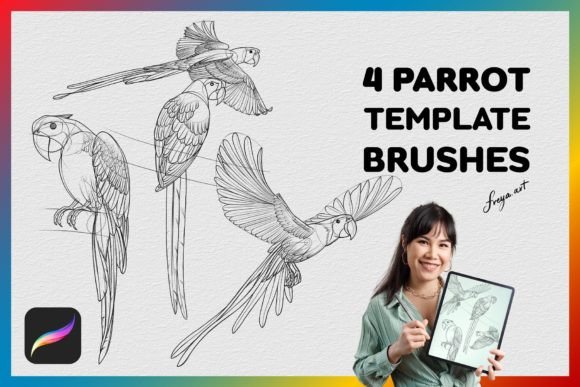
The set typically includes four distinct parrot drawing template stamps and a bonus paper texture brush. These tools are engineered to respond to pressure sensitivity, making them particularly effective when paired with an Apple Pencil. However, before integrating such resources into a professional or hobbyist workflow, it is essential to understand their mechanics, limitations, and how they compare to alternative methods of digital bird illustration.
Understanding the Mechanics of Procreate Parrot Stamp Brushes
The core functionality of the Procreate Parrot Stamp lies in its ability to act as a reusable asset within a canvas. Unlike standard image files that must be imported as references, these brushes function as dynamic layers. When an artist selects the brush and applies a stroke, the software renders the parrot silhouette or outline based on the brush settings. This allows for rapid iteration; an artist can place multiple variations of the subject across a canvas to test composition without redrawing the anatomy each time.
A critical technical distinction is that these brushes are native to the Procreate ecosystem. They rely on the app's specific engine to interpret pressure data from the Apple Pencil. This means the opacity, size, or flow of the stamp can change dynamically as the user presses harder or lighter on the screen. This interaction mimics traditional media, providing a tactile feel that static clip art cannot replicate. The inclusion of a paper texture brush further enhances this effect, allowing the stamped outlines to blend more naturally with hand-painted backgrounds, reducing the "digital" look that often plagues vector-based assets.
It is important to note the platform exclusivity of these tools. The Procreate Parrot Stamp is optimized strictly for the Procreate application on iPad. It does not translate to desktop environments like Adobe Photoshop, Clip Studio Paint, or Krita. While the concept of stamp brushes exists in other software, the specific file format and pressure curve calibration for this set are unique to Procreate. Users looking for cross-platform compatibility will need to seek alternative solutions or convert the assets manually, which may result in a loss of pressure sensitivity.
Comparing Template Stamps to Traditional Sketching Methods
When evaluating whether to use a resource like the Procreate Parrot Stamp, it is helpful to compare it against the traditional method of freehand sketching. Freehand drawing offers unlimited customization; every line is created by the artist's hand, ensuring total uniqueness and control over proportions. This approach is ideal for learning anatomy deeply, as the struggle to draw the form reinforces memory and muscle control.
In contrast, the template stamp approach prioritizes efficiency and consistency. By using the Procreate Parrot Stamp, an artist bypasses the initial construction phase. This is particularly advantageous for commercial projects where deadlines are tight, or for pattern designers who need to repeat a motif dozens of times with slight variations. The trade-off, however, is a potential reliance on the asset. If an artist exclusively uses stamps without understanding the underlying anatomy, their independent drawing skills may stagnate.
Another comparison point is the level of detail provided. Most template sets, including the four-parrot variety, offer simplified outlines or mid-tone shapes. They serve as a foundation rather than a finished piece. An artist must still apply shading, texture, and color. This differs from high-resolution stock photography or fully rendered 3D models, which might provide too much detail, making it difficult to stylize the image. The Procreate Parrot Stamp occupies a middle ground, offering enough structure to guide the eye while leaving ample room for artistic interpretation.
Evaluating Use Cases and Workflow Integration
The decision to adopt the Procreate Parrot Stamp should depend heavily on the intended outcome of the project. There are specific scenarios where this tool provides significant value, and others where it may hinder creativity.
- Pattern Design: For creating seamless patterns for textiles, wrapping paper, or digital backgrounds, consistency is key. The ability to stamp identical or slightly varied parrot shapes rapidly makes this set highly efficient for tiling workflows.
- Concept Art and Storyboarding: When brainstorming character designs or scene compositions, speed is often more valuable than perfection. Using the stamp allows an artist to quickly visualize how a parrot fits into a jungle scene or interacts with other characters before committing to a detailed render.
- Children's Illustration: Projects aimed at younger audiences often require clean, recognizable silhouettes. The template nature of these brushes ensures that the parrots remain proportionally correct and visually appealing without requiring advanced anatomical knowledge.
- Texture Studies: With the included paper texture brush, artists can use the stamps to practice different texturing techniques. By stamping the same shape repeatedly and applying different hatching or stippling styles, one can study how light interacts with feathers.
Conversely, there are situations where this tool may not be the right choice. If the goal is to create hyper-realistic wildlife art, the stylized nature of a template stamp might limit the necessary nuance. Similarly, if an artist is teaching a class focused on fundamental drawing skills, relying on stamps could detract from the educational objective of learning to observe and replicate nature from life or reference photos.
Strengths, Tradeoffs, and Decision Factors
Like any digital asset, the Procreate Parrot Stamp comes with a set of inherent strengths and limitations that influence its utility. Understanding these factors helps in making an informed purchase decision.
The primary strength is time efficiency. Constructing a bird's anatomy, especially the complex geometry of a parrot's head and beak, can take minutes or even hours depending on skill level. A stamp reduces this to seconds. Additionally, the pressure sensitivity adds a layer of expressiveness that static PNG stamps lack, allowing for organic integration into a painting. The inclusion of a paper texture is also a notable benefit, as it solves the common issue of digital lines looking too flat or sterile against textured backgrounds.
However, the limitations are equally clear. The most significant constraint is platform dependency. As mentioned, these brushes are useless outside of the Procreate app on iPad. Furthermore, the variability is limited to the four included designs. If a project requires a specific species of parrot not included in the set, or a specific pose not available in the templates, the artist must either modify the stamp significantly (which can be technically challenging) or switch to freehand drawing.
There is also the consideration of artistic originality. While the stamp is a tool, over-reliance can lead to work that feels generic. To mitigate this, experienced artists often treat the stamp as a rough underdrawing, distorting or erasing parts of it to create something entirely new. The tool should serve the vision, not dictate it.
Alternatives and Complementary Resources
If the Procreate Parrot Stamp does not fit a specific workflow, several alternatives exist. One option is to utilize reference libraries combined with manual tracing or projection tools. This method offers infinite variety but requires more setup time. Another alternative is to use 3D modeling software to generate custom poses, which can then be imported into Procreate as references. This is more versatile but has a steeper learning curve.
For those who prefer the stamp approach but need more variety, exploring other brush sets that focus on different animal categories or pose libraries might be beneficial. Some artists also create their own stamps by drawing a base shape once and saving it as a custom brush, giving them complete control over the source material.
Ultimately, the choice depends on the balance between speed and customization. The Procreate Parrot Stamp set is a specialized tool that excels in specific contexts—pattern design, rapid prototyping, and stylized illustration. It is less suitable for photorealism or educational exercises focused on foundational anatomy. By weighing these factors against personal project requirements, artists can determine if this resource aligns with their creative goals.
For those who decide to proceed, the instant download feature ensures immediate access, allowing for quick testing within the existing workflow. Remember to utilize the Apple Pencil to fully leverage the pressure dynamics, and consider the paper texture brush to add depth to your final pieces. Whether used as a standalone element or a starting point for a larger composition, the effectiveness of the Procreate Parrot Stamp lies in how creatively it is integrated into the broader artistic process.