Procreate Bear Stamp: A Quick Guide to Instant Digital Illustration
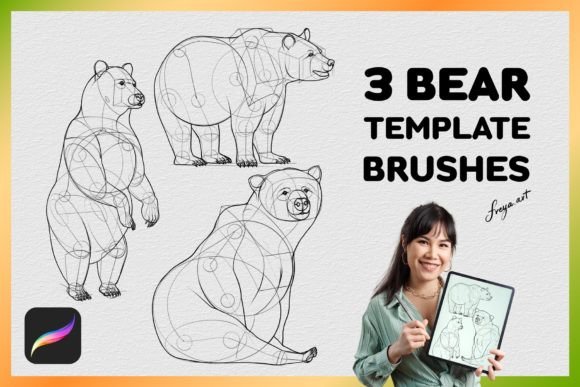
If you have ever stared at a blank canvas in the Procreate app, feeling the pressure of creating something perfect from scratch, you know that sometimes the hardest part is just getting started. That is where tools like the Procreate Bear Stamp come into play. This isn't just another digital asset; it is a practical solution for artists, educators, and small business owners who need to add character and charm to their work without spending hours on detailed anatomy or shading. By integrating a set of three bear drawing template stamps and a bonus paper texture, this tool bridges the gap between complex illustration and efficient design.
Understanding the Core Utility of Digital Stamps
The concept behind a stamp brush in Procreate is straightforward but powerful. Unlike traditional brushes that require you to build a shape stroke by stroke, a stamp brush applies a pre-drawn image instantly upon contact with the screen. When you download the Procreate Bear Stamp, you are essentially acquiring a library of ready-to-use assets that respond to your Apple Pencil's pressure sensitivity. This means you can control the opacity, size, and flow of the bear illustration as if you were painting with ink, rather than just pasting a static JPEG.
For many users, the appeal lies in the consistency these brushes provide. If you are designing a series of greeting cards or creating social media graphics for a brand, maintaining a uniform style across multiple images can be tedious. With a dedicated set of three bear templates, you ensure that every bear looks cohesive, allowing you to focus on composition and color rather than redrawing the same animal repeatedly. The inclusion of a paper texture adds another layer of realism, giving your digital creations a tactile, hand-crafted feel that resonates well with audiences looking for warmth and authenticity.
Real-World Applications for Creators and Educators
The versatility of the Procreate Bear Stamp extends far beyond simple doodling. Consider the scenario of an elementary school teacher preparing visual aids for a lesson on wildlife or forest ecosystems. Drawing realistic animals on a whiteboard or tablet can take valuable class time away from instruction. By using these template brushes, an educator can quickly populate a slide deck or a digital worksheet with friendly bear illustrations, making learning materials more engaging for students without needing advanced artistic skills.
In the realm of content creation, bloggers and social media managers often struggle to produce unique imagery for every post. Stock photos can feel generic, while custom illustrations take too long to commission. A freelance marketer might use the bear stamps to create custom thumbnails for YouTube videos about camping, hiking, or outdoor adventures. The ability to place a cute bear character next to text overlays instantly creates a branded look that feels personal and inviting. Similarly, hobbyists working on digital scrapbooking projects can use these stamps to decorate pages, adding a whimsical touch to family memories or travel journals.
Small Business Branding and Merchandise Design
For entrepreneurs running small businesses, particularly those in the lifestyle, baby, or home decor sectors, branding is everything. Imagine a shop owner selling handmade candles or organic baby clothing. They need packaging labels that convey a sense of nature, comfort, and care. The Procreate Bear Stamp offers a cost-effective way to prototype designs for product labels, business cards, or tote bags. Instead of hiring a graphic designer for a single icon, the business owner can experiment with different poses and arrangements using the three included templates.
Furthermore, the bonus paper texture included in the set allows designers to simulate high-quality print materials directly on their iPad screens. This helps in visualizing how the final product will look when printed, ensuring that the digital design translates well to physical goods. Whether you are planning a line of stationery or designing stickers for a craft fair, having a reliable set of assets speeds up the entire production workflow.
Technical Considerations and Best Practices
Before diving into your next project, it is crucial to understand the technical requirements of these brushes. These assets are specifically engineered for the Procreate app for iPad. They rely heavily on the pressure sensitivity data provided by the Apple Pencil to function correctly. If you attempt to import these files into Adobe Photoshop, Clip Studio Paint, or any other software, they will not work as intended. The dynamic behavior that makes the stamps feel alive—adjusting opacity based on how hard you press—is unique to Procreate's engine.
When downloading the brushes after purchase, the process is designed for immediate use. You receive an instant download link, which typically contains a .brushset file. Importing this file is a simple matter of tapping the "Actions" wrench icon in Procreate, selecting "Add Brushes," and choosing the downloaded file. Once installed, you will find the three bear templates organized in a new folder within your brush library, ready to be selected with a single tap.
It is also worth noting that while these brushes save time, they still require a degree of artistic judgment. The best results come from combining the stamps with other tools. For instance, you might use the bear stamp to lay down the base shape and then switch to a standard watercolor brush to add highlights or shadows, blending the stamp seamlessly into your artwork. The paper texture brush can be used as an overlay on a separate layer to give the entire piece a unified, textured background, preventing the digital elements from looking too flat or sterile.
Why Choose Template Brushes Over Manual Drawing?
The decision to use a tool like the Procreate Bear Stamp often comes down to efficiency and creative flow. While manual drawing is essential for developing fundamental art skills, it is not always the most practical approach for commercial or repetitive tasks. When you are working under a tight deadline for a client project or trying to maintain a consistent posting schedule on social media, the ability to access high-quality assets instantly is invaluable.
Moreover, these brushes democratize the creative process. Not everyone has years of training in anatomy or perspective, but everyone has ideas worth sharing. By lowering the barrier to entry for creating professional-looking illustrations, tools like this empower a wider range of people to express themselves visually. Whether you are a seasoned illustrator looking to speed up your sketching phase or a complete beginner wanting to make your first digital collage, the right set of brushes can transform your workflow from frustrating to fluid.
Ultimately, the value of the Procreate Bear Stamp set lies in its ability to turn a moment of inspiration into a finished piece of art with minimal friction. It respects your time while enhancing your creative output, proving that sometimes the best way to move forward is to have the right tools ready at your fingertips. From educational resources to boutique branding, these digital assets serve as a versatile foundation for countless projects, all accessible through the intuitive interface of the Procreate app.