Outline Brush for Procreate: A Practical Evaluation for Digital Artists
For digital illustrators and lettering artists working within the iPad ecosystem, the choice of brush engine often dictates the final aesthetic of a piece. The Outline Brush for Procreate represents a specific category of tools designed to render strokes with hollow centers or defined edges rather than solid fills. This functionality is particularly valuable for creating decorative elements, calligraphy styles, and intricate patterns where line weight and structure are paramount. When evaluating resources like the 4-lettering brushes pack for Procreate, it is essential to understand not just what the tool does, but how it fits into a broader workflow compared to standard markers or watercolor engines.
This article explores the mechanics, applications, and limitations of outline brushes in Procreate, offering a balanced perspective on when these tools enhance creativity and when they might introduce unnecessary friction. By examining the specific capabilities of an Outline Brush for Procreate, artists can make informed decisions about integrating them into their digital planner designs, greeting cards, or social media content.
Understanding the Mechanics of Outline Brushes
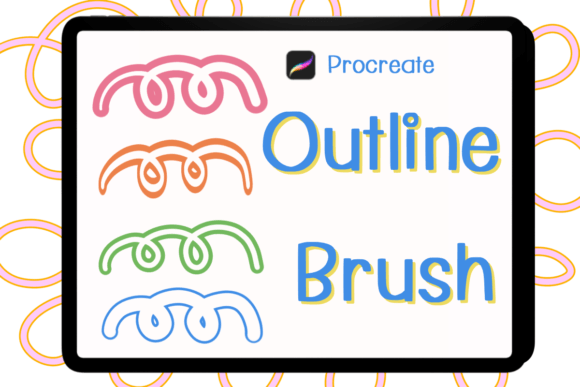
The primary distinction between a standard drawing brush and an Outline Brush for Procreate lies in the rendering logic. Standard brushes typically apply pigment across the entire path of the stroke, creating a solid shape. In contrast, outline brushes utilize complex algorithms to separate the center of the stroke from its perimeter. This allows the artist to create lines that appear as tubes, frames, or double-stroke borders without the need for manual masking or vector tracing.
In the context of the 4-lettering brushes pack, these tools are engineered to mimic the look of hand-drawn outlines often seen in traditional ink work or stencil art. The technology behind these brushes adjusts opacity and flow based on pressure and tilt, ensuring that the "outline" effect remains consistent even when the user varies their speed or angle. This distinct behavior makes them ideal for tasks requiring precision, such as defining the edges of wreaths or creating structured letterforms that need to be filled later with color or texture.
Key Technical Characteristics
- Hollow Stroke Generation: Automatically creates empty centers within the stroke path.
- Pressure Sensitivity: Adjusts the thickness of the outline based on stylus pressure.
- Edge Definition: Provides crisp or textured edges depending on the specific brush setting.
- Layer Compatibility: Works seamlessly with Procreate's layer system for non-destructive editing.
Comparative Analysis: Outline Brushes vs. Alternatives
When selecting tools for a project, it is crucial to compare the Outline Brush for Procreate against other available methods. Many artists achieve similar results using standard brushes combined with selection tools, though this approach requires significantly more time and technical skill. Alternatively, some users opt for vector-based software like Adobe Illustrator or Affinity Designer to create scalable outlines before importing them into Procreate.
Compared to the manual method of drawing two parallel lines to simulate an outline, the dedicated outline brush offers immediate consistency. However, this convenience comes with tradeoffs. Manual drawing allows for organic imperfections that automated brushes sometimes struggle to replicate authentically. If a project demands a highly chaotic, hand-crafted aesthetic where every wobble is intentional, a standard rough marker might yield better results than a mathematically generated outline.
Furthermore, when comparing the 4-lettering brushes pack to generic outline settings found in free libraries, the difference often lies in the customization and stability of the brush engine. Custom packs are frequently tuned to specific use cases, such as bullet journaling or Instagram post creation, ensuring that the stroke behaves predictably at various zoom levels. Generic brushes may suffer from jitter or inconsistent gaps when used for detailed lettering, making specialized packs a more reliable choice for professional output.
Evaluation Criteria for Tool Selection
- Workflow Efficiency: Does the brush save time compared to manual outlining?
- Aesthetic Consistency: Do the strokes maintain uniformity across different layers?
- Customization Potential: Can the brush settings be adjusted for unique textures?
- File Compatibility: Is the brush format optimized specifically for the latest Procreate versions?
Practical Applications and Use Cases
The versatility of an Outline Brush for Procreate extends across various creative disciplines. One of the most common applications is in the creation of greeting cards and digital stationery. The ability to generate clean, hollow shapes allows designers to add intricate details—such as floral wreaths or geometric frames—that serve as containers for text or photographs. These elements provide a polished look that is difficult to achieve with solid fill brushes alone.
Bullet journal enthusiasts also find significant value in these tools. Digital planners often rely on clear, structured layouts where headers and dividers need to stand out without overwhelming the page. An outline brush can create elegant borders and section headers that guide the reader's eye while maintaining a light visual weight. This is particularly useful for those who prefer a minimalist aesthetic over heavy, ink-filled designs.
Social media content creators, especially those focusing on Instagram posts, benefit from the ability to quickly produce graphic assets. The 4-lettering brushes pack, for instance, includes styles tailored for typography. By using these brushes, artists can create headlines and captions that pop against background images. The hollow nature of the strokes allows for creative layering, where colors or patterns can be placed underneath the text to create depth and dimension.
Ideas for Integration
- Digital Planners: Create interactive checkboxes and divider lines with a modern, outlined style.
- Wreath Design: Construct seasonal decorations by layering multiple outline strokes to form complex floral arrangements.
- Typography: Design custom lettering for logos or event invitations that features double-line effects.
- Artwork Decoration: Add framing elements to existing illustrations to draw attention to focal points.
Strengths, Tradeoffs, and Limitations
While the Outline Brush for Procreate offers distinct advantages, it is not a universal solution for every artistic challenge. Its primary strength is efficiency; it drastically reduces the time required to create complex linear structures. For artists producing high volumes of content, such as daily planners or weekly social media graphics, this time-saving factor is invaluable. Additionally, the consistency provided by these brushes ensures a cohesive look throughout a project, which is essential for branding and professional presentation.
However, there are notable limitations. Because these brushes are algorithmic, they can sometimes appear too perfect or rigid, lacking the organic variation found in hand-drawn sketches. This "digital perfection" can be a drawback for projects aiming for a raw, expressive feel. Furthermore, outline brushes are strictly dependent on the Procreate environment. Unlike vector files, they cannot be easily scaled to infinite resolutions without potential quality loss if the canvas size changes significantly after the stroke is drawn.
Another consideration is the file format. The 4-lettering brushes pack arrives as a single zip file containing four specific brush files. While this streamlined delivery is convenient, it means the tools are locked into the Procreate ecosystem. Artists who work across multiple platforms, such as Photoshop or Clip Studio Paint, will not be able to utilize these specific brushes directly. This limitation necessitates a decision about whether the investment in Procreate-specific tools aligns with the artist's broader software strategy.
Decision Factors for Prospective Users
- Platform Commitment: Are you exclusively working within Procreate?
- Style Preference: Do you favor clean, structured lines over messy, organic textures?
- Volume of Work: Do you need to produce repetitive elements quickly?
- Technical Skill: Are you comfortable troubleshooting brush settings, or do you prefer plug-and-play solutions?
Determining the Right Fit for Your Workflow
Deciding whether to integrate an Outline Brush for Procreate into your toolkit depends largely on your specific goals and current workflow bottlenecks. If you find yourself spending excessive time manually tracing lines or struggling to maintain consistency in your lettering, this type of brush pack is likely a strong fit. It is particularly well-suited for artists who specialize in commercial illustration, digital planning, or social media design, where speed and polish are critical.
Conversely, if your artistic style relies heavily on spontaneous, unpredictable mark-making, or if you require assets that must be editable in vector formats, alternative approaches may be more appropriate. In these scenarios, investing time in mastering manual techniques or exploring vector-based workflows could yield more flexible results. The key is to recognize that while the Outline Brush for Procreate solves specific problems efficiently, it is one tool among many in a comprehensive digital artist's arsenal.
Ultimately, the value of the 4-lettering brushes pack lies in its ability to streamline the creation of specific aesthetic elements. By understanding both its capabilities and its constraints, artists can leverage these tools to enhance their productivity without compromising their unique creative voice. Whether you are designing a new set of digital planner stickers or crafting a series of Instagram posts, evaluating the fit of these brushes against your project requirements will ensure that your investment translates into tangible creative benefits.