Evaluating Procreate Oil Pastels X 11 Brushes for Digital Artwork
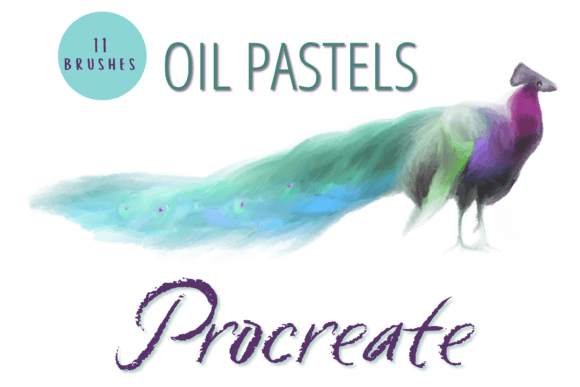
Digital artists constantly seek tools that bridge the gap between traditional media and modern efficiency. The Procreate Oil Pastels X 11 Brushes pack represents a specific solution for those aiming to replicate the tactile, textured feel of physical oil pastels within a digital environment. This set includes eleven unique individual brushes designed to mimic the wax-like consistency, blendability, and opacity of real-world materials. Unlike standard soft airbrushes or rigid markers found in default kits, these hand-created digital assets focus on texture retention and color mixing capabilities.
For professionals and hobbyists alike, understanding the mechanics of this brush pack is essential before integrating it into a workflow. The core value lies in its versatility: each brush can function as a primary painting tool or a blending instrument. However, the pack distinguishes itself through specialized features like self-blending capabilities and smudge tools that react dynamically to pressure and opacity settings. To make an informed decision, one must weigh these specific advantages against the technical requirements and limitations inherent to the Procreate ecosystem.
Core Functionality and Distinctive Features
The defining characteristic of the Procreate Oil Pastels X 11 Brushes is their ability to simulate the physical behavior of oil pastel sticks. Traditional oil pastels are known for their high pigment load and the way they sit on paper, allowing for layering without immediate dilution. These digital brushes attempt to replicate that resistance and buildup. When users apply strokes, the brush engine creates visible grain and texture, avoiding the overly smooth, plastic look often associated with digital art.
A significant strength of this collection is the inclusion of dedicated blend and smudge brushes. In digital painting, achieving a seamless transition between colors often requires switching between different tools or adjusting complex layer settings. With this pack, the blend smudge brushes are engineered to mix colors directly on the canvas, mimicking the finger-smearing technique used with physical pastels. Furthermore, the inclusion of a self-blending brush allows for rapid softening of edges without manual intervention, streamlining the shading process.
Customization is another critical factor. Artists can resize these brushes using the native brush resize tool in Procreate or by utilizing the move and resize tool for more precise adjustments. Additionally, the "ink charge" or strength of the blend can be manipulated through the opacity slider and various blend modes. This flexibility ensures that the same brush can create a delicate wash or a bold, saturated stroke depending on the artist's input. However, this reliance on user-controlled variables means that mastering the pack requires a degree of experimentation to understand how opacity interacts with the specific texture algorithms of each brush.
Technical Requirements and Compatibility Constraints
Before investing time in learning a new brush set, it is crucial to address the hardware and software prerequisites. The Procreate Oil Pastels X 11 Brushes are strictly digital files designed exclusively for the Procreate application on iPad. They will not function on desktop computers, Android tablets, or other drawing apps such as Clip Studio Paint or Adobe Fresco. To utilize these resources, a user must possess an iPad Pro (or compatible iPad model) with the Procreate app installed and an Apple Pencil for optimal pressure sensitivity.
This exclusivity presents a clear tradeoff. While Procreate offers a robust and intuitive interface, the inability to use these brushes outside this specific ecosystem limits their utility for artists who work across multiple platforms. If your workflow involves starting a piece on an iPad but finishing it on a desktop, these brushes cannot follow you. Furthermore, the installation process requires a specific sequence of actions. Users need a platform to download the files, such as iCloud, and a decompression program like iZip to unzip the archive. Once unzipped, the files must be manually imported into Procreate within a named folder.
For beginners unfamiliar with file management on iOS, this step can be a barrier. It requires a basic understanding of cloud storage and file handling, which may not be intuitive for all users. However, for those already comfortable with the iPad ecosystem, the import process is straightforward and ensures the brushes are organized efficiently within the app.
Comparing Digital Pastel Options
When evaluating the Procreate Oil Pastels X 11 Brushes, it is helpful to compare them against other common approaches to digital pastel art. Many artists rely on the default "Dry Media" brushes included with Procreate. While convenient, these stock brushes often lack the specific textural depth and color saturation found in third-party packs like this one. Default brushes tend to produce smoother results that can feel generic, whereas hand-created packs offer unique noise patterns and grain structures that give artwork a more distinctive, handmade quality.
Another alternative is purchasing larger, comprehensive brush libraries containing hundreds of tools. While these offer variety, they can overwhelm users with options that may never be used. The focused nature of the 11-brush pack provides a curated experience, ensuring that every tool serves a specific purpose related to oil pastel techniques. This targeted approach can be more efficient for artists who want to master a specific style rather than juggling a vast array of unrelated tools.
Conversely, some artists prefer creating their own brushes from scratch within Procreate. This method offers total control over every parameter, from grain size to flow dynamics. However, it demands a significant investment of time and technical knowledge. For artists who wish to achieve professional-looking results quickly without the steep learning curve of brush engineering, pre-made sets like the Procreate Oil Pastels X 11 Brushes offer a practical middle ground. They provide the benefits of custom design without the hours of configuration required to build them manually.
Strengths, Tradeoffs, and Best Use Cases
The primary strength of this brush pack lies in its aesthetic output. The resulting artwork possesses a rich, textured appearance that is difficult to achieve with standard digital tools. The ability to mix and match brushes on various projects makes the pack suitable for everything from loose sketches to finished illustrations. The blend modes and opacity controls allow for nuanced color theory application, enabling artists to create depth and dimension effectively.
However, there are tradeoffs to consider. The reliance on specific hardware means that if an artist switches devices or operating systems, these assets become inaccessible. Additionally, while the brushes are versatile, they are optimized for the oil pastel style. Attempting to use them for photorealistic rendering or sharp vector-style line work may yield suboptimal results. The texture inherent in the brushes might interfere with clean lines or smooth gradients required in other artistic disciplines.
This pack is best suited for artists who:
- Are committed to the iPad and Procreate ecosystem.
- Seek a traditional, textured look for their digital illustrations.
- Want to streamline their blending and shading processes.
- Prefer curated, specialized tools over massive, unorganized libraries.
On the other hand, artists who require cross-platform compatibility, work primarily on desktops, or need highly specialized tools for non-pastel styles may find better alternatives elsewhere. For instance, those working in animation or UI design might find the heavy texture of oil pastels distracting and counterproductive to their goals.
Decision Factors for Potential Users
Deciding whether to integrate the Procreate Oil Pastels X 11 Brushes into your toolkit depends on aligning the product's capabilities with your specific artistic needs. If your goal is to expand your visual vocabulary with a medium that feels organic and expressive, this pack offers a compelling solution. The hand-crafted nature of the brushes ensures a level of detail and character that generic presets often lack.
Consider your current workflow. If you frequently struggle with blending colors digitally or find that your work looks too "clean" and artificial, these brushes could solve those specific pain points. The self-blending feature, in particular, addresses a common frustration in digital painting where achieving natural transitions can be tedious. By reducing the number of steps required to blend, the pack allows artists to focus more on composition and creativity.
Finally, evaluate the cost-benefit ratio relative to your time. While there is a financial cost to acquiring third-party brushes, the time saved in setup and the quality improvement in the final output often justify the investment. However, if you are just beginning your digital art journey and are unsure about your preferred style, it may be prudent to experiment with free resources or default tools first. Once you have identified a preference for textured, painterly styles, the Procreate Oil Pastels X 11 Brushes becomes a logical next step to refine that specific aesthetic.