Enhancing Designs with Decorative Borders
In the realm of digital design and print media, the space between content often speaks just as loudly as the content itself. This is where Decorative Borders play a pivotal role. Far more than simple lines separating sections, these elements act as visual anchors that guide the eye, establish hierarchy, and infuse a project with personality. Whether you are crafting a wedding invitation, designing a website layout, or creating a professional report, the right border can transform a flat composition into a polished masterpiece.
The Art and Utility of Visual Framing
At their core, Decorative Borders serve to define boundaries while adding aesthetic value. Unlike standard geometric lines which can feel sterile or overly functional, decorative options introduce texture, pattern, and style. A well-chosen border can suggest elegance, playfulness, or robustness depending on its design. For instance, an intricate gold frame might imply luxury and tradition, whereas a simple, clean divider could signal modern minimalism.
The utility of these elements extends beyond mere decoration. They help organize information by grouping related items together, making complex documents easier to scan and understand. In web design, they separate navigation from content; in print, they highlight testimonials or quotes. By effectively utilizing Decorative Borders, creators can subtly direct the viewer's attention without relying solely on bold fonts or bright colors.
Why Specific Collections Matter
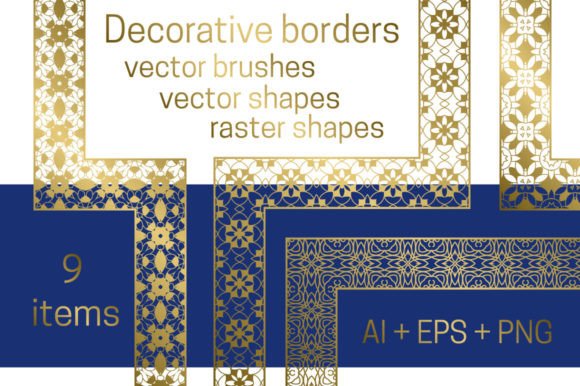
While many design tools offer basic shapes, curated packages provide a level of consistency and quality that is hard to achieve from scratch. Consider a collection featuring nine distinct decorative borders designed specifically for frames and dividers. Such a package ensures that every element shares a cohesive style, allowing designers to mix and match without worrying about visual clashes. This consistency is crucial for branding, where maintaining a unified look across various materials is essential.
These collections often cater to different technical workflows. For professionals using Adobe Illustrator CS6 or Creative Cloud (CC), the ability to access vector borders directly from the brush panel is a game-changer. Vector graphics remain crisp at any resolution, meaning a border used on a business card will look just as sharp when scaled up for a billboard. This scalability is a primary advantage of vector-based Decorative Borders.
Technical Versatility: From Vectors to PNGs
One of the most significant strengths of a comprehensive border package is its adaptability across different software environments. Not every creator has access to high-end vector editing suites, and that is perfectly acceptable. A well-structured resource will include alternatives for users working with other applications. In cases where advanced vector tools are unavailable, users can utilize pre-made shapes to create brushes manually. This approach democratizes design, ensuring that hobbyists and small business owners can achieve professional results regardless of their software stack.
Furthermore, the inclusion of PNG files with transparent backgrounds adds another layer of flexibility. Raster images like PNGs are ideal for quick drop-ins into photo editing software, presentation slides, or social media graphics where vector manipulation isn't necessary. The transparency ensures that the border blends seamlessly with any background color or image, eliminating the need for time-consuming masking or erasing tasks. This dual-format availability—vector for precision and PNG for speed—makes the resource invaluable for a wide range of users.
Bonus Elements: Gold Frames and Shapes
Often, a design project requires more than just linear dividers; it needs complete framing solutions. Many comprehensive packages include bonus assets such as round and square gold frames. These additions open up new creative possibilities. A gold frame, for example, instantly elevates a portrait or a certificate, giving it a sense of prestige and formality. The inclusion of both round and square variations allows designers to experiment with geometry, balancing soft curves against sharp angles to create dynamic compositions.
These bonus frames are particularly useful for specific industries. Real estate agents might use them for property listings to make photos pop, while event planners could employ them for elegant invitations. The versatility of having both linear borders and full-frame options within a single download means less time searching for disparate assets and more time focusing on the actual creative process.
Real-World Applications and Scenarios
To truly understand the value of Decorative Borders, it helps to visualize how they function in real-world scenarios. Imagine a small bakery owner designing a menu. A simple text list might look boring, but wrapping the daily specials in a delicate, flour-dusted style border immediately evokes the warmth and craftsmanship of the shop. Similarly, a tech startup creating a whitepaper might use sleek, metallic dividers to convey innovation and precision.
- Web Development: Using PNG borders to separate blog posts from sidebar widgets creates a clean, magazine-like reading experience.
- Print Media: Applying vector borders to brochures ensures that the edges remain razor-sharp even after high-volume printing.
- Social Media: Adding gold frames to Instagram posts can create a consistent brand identity that stands out in a crowded feed.
- Education: Teachers can use colorful, playful borders to make worksheets more engaging for students.
Each of these scenarios highlights how a single asset pack can serve multiple purposes. The key is understanding the context. A heavy, ornate border might overwhelm a minimalist website but would be perfect for a formal wedding program. Conversely, a thin, subtle line might be invisible on a busy flyer but ideal for a corporate annual report.
Evaluating Suitability for Your Projects
When deciding whether a set of Decorative Borders fits your needs, consider the complexity of your workflow and the final output medium. If you anticipate needing to resize elements frequently, prioritize vector formats available in the brush panel for Adobe users. If your work involves rapid prototyping or non-vector software, the PNG versions with transparent backgrounds will save you valuable time.
It is also important to assess the stylistic alignment. Does the aesthetic of the borders match your brand voice? A mismatched border can distract from the message rather than enhance it. Before committing to a design, test the borders with your actual content. Look at how the weight of the lines interacts with your typography and imagery. Sometimes, a border that looks great in isolation can feel too heavy or too light when placed next to specific text.
Limitations and Practical Expectations
While these resources are powerful, they are not magic bullets. A border cannot fix poor layout fundamentals or bad typography. It is an enhancer, not a savior. Additionally, overusing decorative elements can lead to visual clutter. The goal is to use Decorative Borders sparingly and strategically. Too many competing patterns can confuse the viewer and dilute the impact of your main content.
Another consideration is file management. When working with mixed formats (vectors and PNGs), ensure your project files are organized correctly to avoid version control issues. Always keep the original vector files safe, as they allow for future modifications if your project requirements change. Understanding these practical limitations ensures that you get the most out of the assets without running into technical hurdles down the road.
Conclusion: Elevating Your Creative Output
Ultimately, the integration of Decorative Borders into your workflow is about adding a layer of refinement that separates amateur work from professional execution. Whether you are leveraging the power of vector brushes in Adobe Illustrator or simply dragging and dropping transparent PNGs, these tools offer a straightforward way to improve visual communication. With a package offering nine unique styles plus bonus gold frames, the potential for creativity is vast.
By understanding the purpose, features, and appropriate applications of these borders, you can make informed decisions that enhance your projects. Remember, the best design choices are those that serve the content and resonate with the audience. So, explore the possibilities, experiment with different combinations, and let your designs speak volumes through the subtle yet powerful art of framing.