Unlocking Handwritten Charm with the Little Lettering Procreate Brush
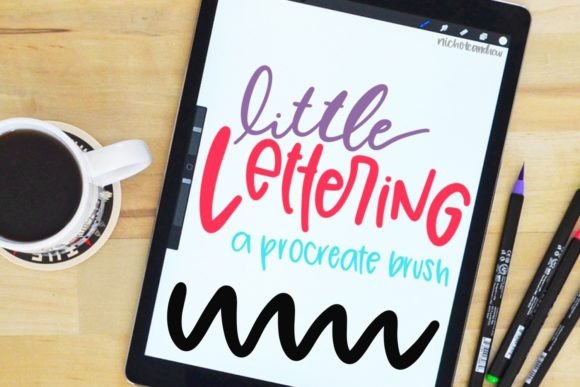
There is a distinct warmth to hand-drawn typography that digital fonts often struggle to replicate. It carries the imperfection of the human hand, the slight variation in stroke weight, and the organic flow of ink on paper. For designers, illustrators, and hobbyists working within the Apple ecosystem, the Little Lettering Procreate Brush offers a bridge between that analog charm and digital efficiency. This tool isn't just another texture; it is a dedicated instrument designed to mimic the delicate, whimsical feel of fine-point markers or fountain pens, allowing creators to craft bespoke headlines, captions, and decorative elements directly on their iPad.
The beauty of this brush lies in its versatility across various creative landscapes. Whether you are sketching out a logo concept for a boutique coffee shop, designing an invitation suite for a wedding, or adding handwritten notes to a digital journal, this brush provides a consistent yet natural aesthetic. It removes the friction of trying to draw every letter perfectly from scratch while retaining the soulful character that makes hand-lettering so appealing. By integrating the Little Lettering Procreate Brush into your workflow, you gain the ability to produce professional-grade typographic art without needing years of traditional calligraphy training.
Real-World Applications for Modern Creators
The true value of any digital asset is found in how it solves problems in real-world scenarios. The Little Lettering Procreate Brush shines particularly well in industries where personalization and authenticity are currency. Consider the social media manager creating content for a lifestyle brand. Stock photos and rigid sans-serif fonts can feel cold and corporate. By overlaying a custom headline created with this brush, the content immediately feels more approachable and human. A quote about morning routines or a product announcement gains a layer of intimacy that resonates deeply with audiences aged 20 to 50 who crave genuine connection.
In the realm of event planning and stationery design, the demand for unique, non-repetitive text is high. When designing digital invitations or save-the-date cards, using a standard font can make an event feel generic. With this brush, a designer can write "You're Invited" or "Celebrate With Us" in a way that looks like it was penned by a skilled calligrapher. Each instance of the lettering has subtle variations, ensuring that no two designs look exactly alike. This is crucial for clients who want their branding to stand out in a crowded market.
Furthermore, educators and content creators producing tutorials or study guides benefit significantly from this tool. Highlighting key points with a handwritten style helps break up dense blocks of text, guiding the reader's eye and making information more digestible. The brush mimics the experience of writing on a whiteboard or a notebook, which can subconsciously lower the barrier to entry for learners, making complex topics feel more accessible and friendly.
Diverse Audiences and Creative Purposes
Different users will find different strengths in the Little Lettering Procreate Brush. For the freelance graphic designer, it is a time-saver that allows for rapid prototyping of logo concepts. Instead of spending hours vectorizing hand-drawn sketches, they can draft directly in Procreate, refining the strokes until they are perfect before moving to Illustrator. For the amateur artist or journaler, it serves as an inspiration engine. Sometimes the act of drawing letters by hand can be intimidating due to the fear of mistakes. This brush encourages experimentation, allowing users to play with spacing, size, and flow without the pressure of permanent ink.
Small business owners also find immense utility here. Many entrepreneurs manage their own marketing materials and need to maintain a cohesive brand voice. If their brand identity is built around friendliness and craftsmanship, using a pre-made font might not capture that essence. By utilizing this brush, they can create custom signage, packaging labels, or Instagram stories that align perfectly with their brand story, all without hiring a specialist typographer for every single project.
Technical Considerations and Compatibility
Before diving into your next project, it is essential to understand the environment in which this tool operates. The Little Lettering Procreate Brush is specifically engineered for the Procreate app on the iPad. It is not compatible with desktop versions of Procreate (which do not exist), nor does it function within other illustration apps like Adobe Fresco or Affinity Designer without significant conversion work. This exclusivity ensures that the brush settings—such as grain, wetness, and pressure sensitivity—are optimized for the Apple Pencil and the specific rendering engine of Procreate.
One common consideration is the resolution of your canvas. Because this brush mimics fine-line tools, it performs best on canvases with sufficient pixel density. If you are creating artwork intended for large-scale printing, ensure your canvas dimensions are set high enough to prevent the brush strokes from appearing pixelated when scaled up. Conversely, for social media graphics, a standard 1080x1080 or 1080x1920 canvas works perfectly, offering crisp lines that render beautifully on mobile screens.
Another practical aspect is the learning curve associated with pressure sensitivity. While the brush is user-friendly, getting the most out of it requires a bit of familiarity with your Apple Pencil's tilt and pressure settings. Users should take a moment to test the brush on a blank layer, experimenting with light versus heavy touches to see how the stroke width changes. This practice ensures that when you start your actual design, the lettering flows naturally rather than looking stiff or robotic.
Seamless Importation: Getting Started Quickly
Integrating new tools into your creative arsenal should be effortless, and importing the Little Lettering Procreate Brush is designed to be straightforward. There are two primary methods to get this brush into your library, depending on your preferred workflow.
Method One: Direct File Access
If you have downloaded the brush files directly to your iPad, the process begins by locating them in your Files app. Once you find the downloaded package, you must unzip the file if it is compressed. Navigate to the unzipped folder and tap on the brush file itself. In many cases, simply tapping the file will trigger a prompt asking if you want to open it in Procreate. Clicking yes will automatically import the brush into your current library, ready for immediate use.
Method Two: Import via the Procreate Interface
Alternatively, you can initiate the import directly from within the application. Open the Procreate app and either create a new canvas or select an existing one. Tap on the wrench icon to access the actions menu, then navigate to the Brushes tab. Look for the plus sign (+) located in the top left corner of the brush library screen. Select "Import" from the dropdown menu. You will be directed to your device's storage, where you can browse the Downloads folder or iCloud Drive to locate the brush file. Once you tap the file, it will instantly appear in your brush set, categorized under "Imported."
Strengths and Limitations to Keep in Mind
Like any specialized tool, the Little Lettering Procreate Brush has specific strengths and potential limitations. Its greatest strength is its ability to simulate the unpredictability of real ink. The brush settings include grain and scatter effects that prevent the "perfect loop" look often seen in vector fonts, giving your work a tactile quality. This makes it ideal for projects requiring a rustic, vintage, or artisanal vibe.
However, users should be aware of its limitations regarding scalability and editing. Unlike vector text, lettering created with this brush is raster-based. Once you draw the letters, they become part of the image. You cannot easily change the spelling or resize the text drastically without losing quality. Therefore, it is best used for finalizing designs or creating static assets rather than for editable body copy. Additionally, because it relies heavily on the speed and pressure of the user's hand, achieving uniformity across long paragraphs can be challenging. It excels at short phrases, headlines, and decorative flourishes but may require patience for longer texts.
Ultimately, the Little Lettering Procreate Brush is more than just a digital asset; it is a catalyst for creativity. It empowers users to inject personality into their digital work, transforming standard layouts into engaging visual experiences. By understanding its applications, mastering the import process, and respecting its technical nuances, creators can unlock a world of expressive possibilities right at their fingertips.