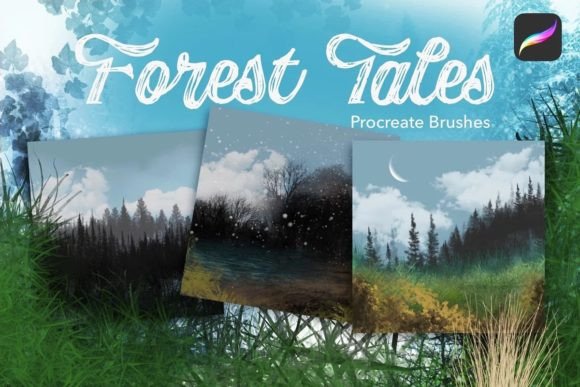
Forest Tales Scene Creator for Procreate
Digital landscape painting often feels like a marathon of repetitive strokes. You spend hours sketching individual blades of grass, placing trees one by one, and trying to make the sky look natural. The Forest Tales Scene Creator changes this dynamic entirely. It is a specialized landscape creator kit designed specifically for Procreate, offering a streamlined way to build immersive woodland environments without sacrificing artistic control. With a collection of 74 distinct brushes, this tool allows artists to mix and match elements to generate complex scenery, from dense forests to open meadows, in a fraction of the time.
Building Depth with Specialized Brushes
The true power of this kit lies in its versatility. Unlike generic brush sets that offer basic shapes, the Forest Tales Scene Creator includes tools engineered to interact with each other. For instance, the included grasses are not just single-color lines. Several of these brushes utilize a secondary color to automatically create depth and visual interest. When you swipe your stylus across the canvas, the brush deposits foreground and background tones simultaneously, mimicking the natural layering found in real meadows. This feature is particularly valuable for beginners who struggle with color theory or shading techniques, as it builds dimension into the artwork instantly.
Beyond the ground cover, the kit addresses the most time-consuming part of landscape art: the trees. The set features Auto Tree lines available in both summer and winter variations. These brushes allow you to draw a single stroke that generates a row of trees with varying heights and spacing, creating a believable horizon line immediately. If you need more specific placement, the kit also provides individual tree brushes. This combination means you can establish the overall atmosphere of a forest quickly with the auto-lines and then add focal points or unique specimens using the individual options.
Adding Life and Atmosphere
A static landscape can feel lifeless without movement and detail. The Forest Tales Scene Creator solves this with its "Magic leaf scatter" brushes. These tools are designed to quickly populate branches and clearings with foliage, adding texture and organic chaos that is difficult to achieve manually. Instead of drawing hundreds of tiny leaves, a few taps of the stylas distribute them naturally, respecting the flow of wind or the density of the canopy.
Atmosphere is equally critical in digital painting. The kit includes a robust selection of weather and sky tools, including clouds, moon, and snow brushes. Whether you are painting a serene summer evening or a blustery winter storm, these brushes help set the mood. The snow brushes, for example, can be layered over your autumn or summer scenes to instantly transform the season, allowing for rapid experimentation with different lighting conditions and seasonal themes.
Grounding Your Composition
The foundation of any good scene is the ground itself. Flat colors rarely look realistic, which is why textural and grunge effects are essential. The Forest Tales Scene Creator includes specific brushes to build up ground, paths, and water bodies. These tools add the necessary grit, mud, ripples, and stone textures that anchor the scene. By layering these grunge effects, artists can create worn forest paths that tell a story of travel or reflective water surfaces that mirror the sky above. This attention to surface detail elevates the work from a simple illustration to a rich, tactile environment.
To complete the ecosystem, the kit offers plants, flowers, animals, and birds. These elements serve as the finishing touches that bring a scene to life. A path is just a line until a small bird lands on it; a field is just green until wildflowers dot the landscape. These assets are designed to integrate seamlessly with the rest of the brush set, ensuring that the scale and style remain consistent throughout the piece.
Ideal Uses for Creators and Professionals
Who benefits most from this toolkit? The audience is broad, ranging from hobbyists to professional illustrators. For beginners, the Forest Tales Scene Creator acts as a training wheel system. It removes the intimidation of blank canvases by providing ready-made structures to build upon. Students can focus on composition and color harmony rather than getting bogged down in technical execution.
Freelancers and small business owners will find immense value in the speed and efficiency of these brushes. In a commercial context, time is money. Being able to produce high-quality background art for book covers, game assets, or marketing materials in minutes rather than hours increases productivity significantly. The ability to rapidly iterate on ideas—swapping a summer forest for a winter wonderland with a few clicks—allows for faster client approvals and more creative exploration.
Educators and bloggers can also leverage this kit to create engaging visual content. Teachers can use the pre-made scenes to demonstrate concepts in ecology or geography, while content creators can generate unique, copyright-free backgrounds for their social media posts or tutorials. The consistency of the brush styles ensures that all generated content looks cohesive, which is vital for building a recognizable brand aesthetic.
Practical Considerations Before You Start
While the Forest Tales Scene Creator is powerful, it requires some thought to use effectively. The primary consideration is understanding that these are tools, not magic wands. The best results come when you treat the brushes as a starting point rather than a final product. Relying too heavily on the auto-generated elements can sometimes lead to a repetitive or "stamped" look. To avoid this, vary your opacity, rotate your canvas, and manually adjust the placement of key elements like the individual trees or animal figures.
Another factor to consider is your workflow within Procreate. Since there are 74 brushes, organization is key. Take time to familiarize yourself with the naming conventions and groupings within the set. Experiment with blending modes to see how the secondary colors in the grass brushes interact with your chosen palette. Understanding how the textural brushes layer over one another will help you achieve the desired level of realism.
Finally, keep your end goal in mind. Are you creating a detailed print, a mobile game asset, or a quick social media graphic? The resolution and level of detail required will dictate how you apply the brushes. For large-scale prints, you may want to zoom in and refine the edges of the Auto Tree lines. For smaller formats, the default settings might provide exactly the right amount of texture without overwhelming the viewer.
Unlocking Creative Potential
The Forest Tales Scene Creator represents a shift in how digital landscapes are approached. By combining the efficiency of automation with the flexibility of manual artistry, it empowers users to create stunning woodland effects with ease. Whether you are an entrepreneur looking to expand your design services or a hobbyist wanting to capture the beauty of nature, this kit provides the necessary ingredients for success. It bridges the gap between technical skill and creative vision, allowing anyone with a tablet to craft enchanting forest tales that resonate with viewers.