Evaluating the Procreate Raccoon Stamp for Digital Illustration
In the expansive ecosystem of digital art tools, specific asset packs often emerge to address niche creative needs. The Procreate Raccoon Stamp and its accompanying set of three raccoon template brushes represent one such specialized resource designed for artists using the Procreate application on iPad. For creators looking to incorporate wildlife elements into their work without starting from scratch, understanding the utility, limitations, and appropriate use cases of these brushes is essential before making a purchase or integrating them into a workflow.
Understanding the Tool and Its Components
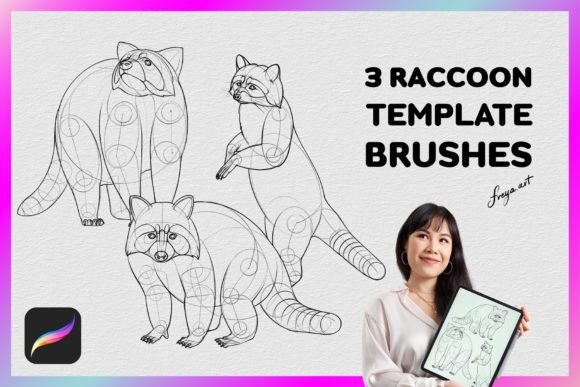
The product in question is not a single brush but a curated collection intended to streamline the process of drawing raccoons. It typically includes three distinct raccoon drawing template stamp brushes and a bonus paper texture. These are pre-configured settings within the Procreate engine that allow users to place a detailed image of a raccoon onto their canvas with a single tap or drag.
It is crucial to understand the technical nature of these assets. They are strictly formatted as .brushset files, meaning they are native to the Procreate app for iPad. Unlike universal file formats such as PNGs or PSDs, these brushes do not function in other software environments like Adobe Photoshop, Clip Studio Paint, or desktop-based illustration programs. This exclusivity defines the primary boundary of their utility; if your workflow relies on cross-platform compatibility, this tool may not align with your technical requirements.
Reasons for Interest: Efficiency and Consistency
Artists typically seek out resources like the Procreate Raccoon Stamp for two primary reasons: speed and consistency. Drawing complex animals requires a solid understanding of anatomy, fur texture, and facial structure. Even experienced illustrators can spend significant time refining the proportions of a raccoon's mask, ears, and paws. By utilizing a stamp brush, an artist can bypass the initial construction phase, placing a reference-quality shape directly onto the canvas.
This efficiency is particularly valuable in scenarios requiring multiple instances of the same subject. For example, a children's book illustrator needing to populate a forest scene with several raccoons can maintain visual consistency across all characters by using the same stamp. Similarly, designers creating patterns or repeating motifs benefit from the ability to replicate a specific design element instantly. The inclusion of a paper texture further enhances this utility, allowing artists to add a tactile, organic feel to their digital work, which is often a desired aesthetic in modern illustration.
Benefits and Workflow Integration
The primary benefit of using the Procreate Raccoon Stamp is the reduction of repetitive labor. When combined with the Apple Pencil, these brushes leverage pressure sensitivity to control opacity and size, offering a degree of control that static images lack. Users can vary the intensity of the stamp to create depth, layering lighter applications behind darker ones to simulate distance or shadow.
Furthermore, the "template" aspect suggests that these stamps serve as a foundation rather than a final product. Artists can trace over the stamped image, adjust the layers, or use blending modes to integrate the raccoon seamlessly into a new environment. This approach allows for customization while retaining the structural integrity of the original design. The instant download feature ensures that there is no waiting period for shipping or email delivery, allowing for immediate integration into a project.
Tradeoffs and Limitations to Consider
While the efficiency gains are clear, there are inherent tradeoffs when relying on stamp brushes. The most significant consideration is artistic originality. Over-reliance on pre-made stamps can lead to work that feels generic or lacks the unique character of hand-drawn elements. If the goal is to develop personal drawing skills or create highly stylized, unique interpretations of animals, using a stamp might hinder that growth.
Additionally, the resolution and style of the stamp are fixed at the point of creation. If the included raccoon illustrations do not match the specific artistic style of the user—such as line weight, shading technique, or level of detail—the artist will need to invest significant time modifying the stamp to fit their vision. In some cases, it may be more efficient to draw the element from scratch than to edit a mismatched stamp.
Another limitation is the platform lock-in. Because these brushes are exclusive to Procreate on iPad, they cannot be used if an artist switches devices or prefers working on a desktop computer. This creates a dependency on the iPad ecosystem, which may not be suitable for every professional setup.
Ideal Use Cases vs. Alternative Approaches
The Procreate Raccoon Stamp is a strong fit for specific situations. It is ideal for hobbyists who want to create cute illustrations quickly without advanced anatomical knowledge. It also serves well for professionals under tight deadlines who need to generate background elements or crowd scenes where individual detail is less critical than overall composition. Pattern designers and scrapbookers using digital tools will also find the repetition capabilities highly beneficial.
However, alternatives may be worth considering in other contexts. If an artist is commissioning work for a client who demands 100% original, hand-drawn assets, using a stamp might violate the terms of the agreement or ethical standards of the industry. In such cases, using reference photos or sketching from life is the preferred method. Furthermore, if the artist works primarily in Adobe Illustrator or Photoshop, investing in Procreate-specific brushes offers no value. Instead, purchasing vector SVG files or high-resolution PNG cutouts would provide similar functionality across different software platforms.
Practical Decision-Making Insights
Before deciding whether to acquire the Procreate Raccoon Stamp, potential users should evaluate their current workflow and project goals. Ask yourself if the time saved justifies the cost and the potential loss of stylistic uniqueness. If you are building a library of assets for rapid prototyping or personal projects, the investment is likely sound. However, if you are seeking to master animal anatomy or require cross-software compatibility, this specific tool may not be the optimal solution.
Consider also the learning curve. While stamps are easy to apply, mastering the pressure sensitivity and layering techniques required to make them look natural takes practice. Ensure you have access to an iPad and an Apple Pencil, as the brush performance relies heavily on these hardware inputs. Without them, the full potential of the brush set cannot be realized.
Ultimately, the Procreate Raccoon Stamp is a functional tool designed to enhance productivity within a specific digital environment. It excels at providing quick, consistent results for those who understand its limitations regarding originality and platform compatibility. By weighing these factors against your specific artistic objectives, you can determine if this resource aligns with your creative needs or if a more traditional drawing approach is better suited to your goals.