Alphabet Number Procreate Brush Stamps
In the fast-paced world of digital design, speed and precision often dictate the quality of your final output. Whether you are a social media manager racing against a deadline or an educator creating engaging worksheets, having the right tools can transform a tedious task into a seamless workflow. The Alphabet Number Procreate Brush Stamps set is exactly that kind of tool. It bridges the gap between traditional typography and the fluidity of digital art, offering a collection of pre-made characters that function as stamp brushes within the Procreate app.
This isn't just another font download; it is a specialized asset designed specifically for iPad creators who need to integrate text directly into their illustrations without leaving their canvas. By converting standard letters and numbers into brush stamps, this set allows you to "paint" your text with the same freedom you use for drawing lines or filling shapes. This capability opens up a unique avenue for personalization, making it an essential addition for anyone serious about digital planning, scrapbooking, or graphic design on the go.
Why Digital Artists Need Custom Text Tools
One of the most common frustrations in digital illustration is the rigid nature of standard text layers. While Procreate's native text tool is functional, it often lacks the organic feel required for hand-lettered aesthetics or custom branding. When you try to mix typed text with hand-drawn elements, the contrast can sometimes look disjointed. The Alphabet Number Procreate Brush Stamps solve this by treating every character as a distinct brush stroke.
Imagine designing an Instagram post where the headline needs to look like it was sketched freehand but must remain perfectly legible. Typing out each letter individually takes time, and using a standard font might not match the artistic style of your background. With these brush stamps, you can tap the screen to place each letter, then adjust its size, opacity, and color instantly. This method gives you granular control over the spacing, slant, and texture of your text, allowing you to create a cohesive visual identity that feels authentically handmade.
Key Features of the Collection
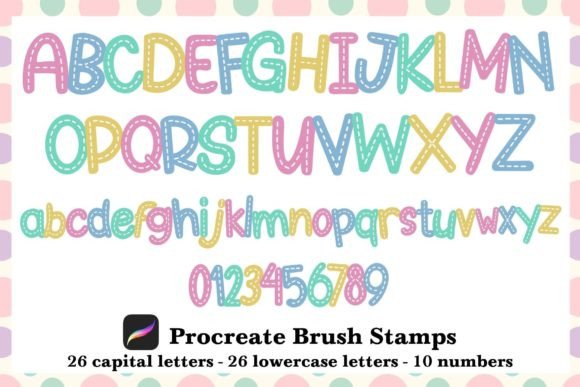
The versatility of this set lies in its comprehensive coverage of the basic building blocks of communication. The package includes a single zipped file containing two distinct alphabets and a full numeric range. Specifically, you get:
- 26 Uppercase Letters: Perfect for headlines, logos, and bold statements.
- 26 Lowercase Letters: Ideal for body text, captions, and softer design elements.
- Numbers 0-9: Essential for dates, pricing, lists, and data visualization.
These aren't static images; they are dynamic brushes. Once imported, you can resize them on the fly to fit any composition. You can also manipulate the opacity to create faded effects or layer multiple taps to build depth. This flexibility means the same set of brushes can serve for a high-contrast poster or a subtle watermark, adapting to the specific needs of your project.
Practical Applications Across Industries
The utility of the Alphabet Number Procreate Brush Stamps extends far beyond simple hobbyist projects. Professionals across various sectors can leverage these tools to enhance their productivity and creative output.
Digital Planning and Productivity
For the growing community of digital planners, consistency is key. Many users rely on Procreate to manage their schedules, journals, and goals. However, writing out headers or dates by hand every day can be repetitive. These brush stamps allow you to quickly stamp out "Monday," "February," or "Goal Tracker" with a consistent style that matches your planner's theme. You can change colors to code different categories or resize the text to fit small pockets in your layout, significantly speeding up your daily setup process.
Social Media and Marketing
Content creators and marketers know that visual engagement drives clicks. Generic stock photos with overlaid standard fonts rarely capture attention in a crowded feed. Using these stamp brushes, you can create unique Instagram posts, Stories, and Pinterest pins that stand out. The ability to customize the text's appearance ensures it aligns perfectly with your brand guidelines while maintaining a fresh, human touch. For entrepreneurs selling digital products, these stamps can be used to create mockups, sale graphics, and promotional banners that feel exclusive and professionally crafted.
Educational Resources and Scrapbooking
Teachers and educators frequently create visual aids, flashcards, and lesson plans. The Alphabet Number Procreate Brush Stamps provide a fun way to make learning materials more engaging for students. You can easily create colorful number charts or alphabet practice sheets that look hand-drawn and inviting. Similarly, digital scrapbookers can use these tools to add titles and dates to their memory pages without needing to switch between apps or worry about font licensing issues.
Installation and Workflow Integration
Getting started with this resource is straightforward, designed to fit seamlessly into your existing Procreate workflow. The process eliminates the technical hurdles often associated with importing third-party assets.
- Download and Unzip: Begin by downloading the zipped file from your source. On your iPad, locate the file in your Files app and unzip it to reveal the brush set file (usually ending in .brushset).
- Import to Procreate: Tap on the unzipped brush file. Your iPad will automatically recognize the format and prompt you to open it in Procreate. If prompted, select "Open in Procreate."
- Access Your Brushes: Once inside the app, navigate to the Brush Library. You will find a new category containing the Alphabet and Number stamps.
Using the brushes is intuitive. Select the desired stamp from the library, choose your preferred color, and simply tap the canvas to place the character. Because these are brushes, you have full access to the brush settings menu. You can adjust the size slider to make a giant "A" for a title or shrink it down for fine print. Changing the opacity allows for subtle overlays, while blending modes can help the text integrate with textured backgrounds.
Maximizing Efficiency and Creativity
To truly master these tools, consider experimenting with layering. Place a base color behind your stamped text and use a slightly darker shade for the letters to create a shadow effect. Alternatively, use the selection tool to group multiple letters together and move them as a single unit, ensuring perfect alignment. Remember that while these stamps offer consistency, they still allow for artistic deviation. Slightly rotating a letter or overlapping numbers can add a dynamic, playful energy to your designs that rigid typefaces cannot achieve.
Whether you are building a brand, organizing your life, or capturing memories, the Alphabet Number Procreate Brush Stamps offer a practical solution for adding custom typography to your digital creations. They combine the efficiency of pre-made assets with the creative freedom of hand-drawing, making them an invaluable resource for modern digital artists.